PAW Patrol Rescue World
- 4.3
- Rating
- 50.00M
- Installs
- Free
- Price
 Analysis by App-foxy
PAW Patrol Rescue World is the kind of casual game I would hand to a young child who already enjoys the rescue team and wants something simple to explore. I spent time with it as a preschool-focused experience, and my first impression was clear: it is built around short, friendly activities rather than deep strategy or demanding controls. That makes it approachable, but it also means parents should understand what it can and cannot offer before installing it.
Developed by Budge Studios, the game is free to download and is rated for Everyone. It has attracted more than 50 million installs and holds an average rating of 4.3 from roughly 166 thousand ratings, so it is clearly familiar to a large audience of families. The current version is 2026.3.1 and it works on devices running Android 5.1 or later. Those details make it accessible on many older phones and tablets, although the actual experience still depends on the device, available storage, and how comfortably a child can use its touch screen.
How I would use it with a child
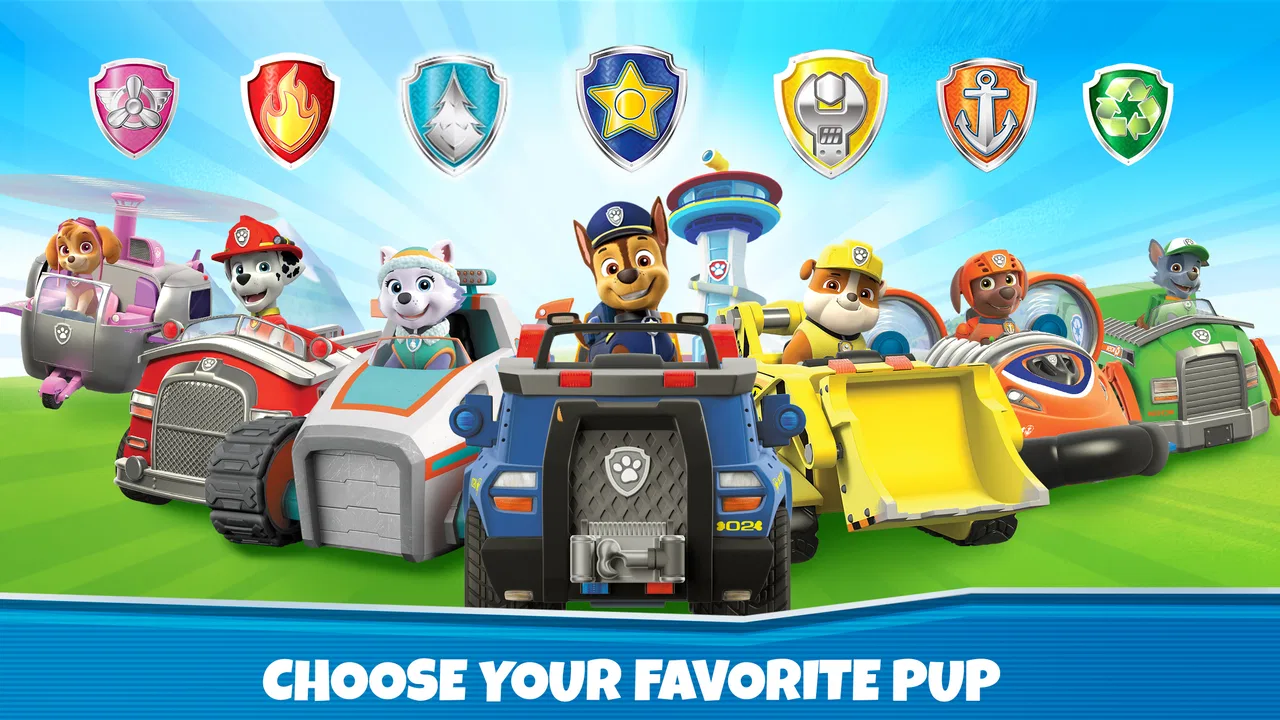
The basic workflow is easy to understand. A child opens the game, enters the PAW Patrol world, chooses an activity or character-led moment, and taps through the available interactions. The presentation does most of the explaining visually, which is useful for children who cannot read confidently yet. I did not need to turn the experience into a lesson before handing it over; the colorful scenes and familiar characters make the purpose of each interaction fairly obvious.
You May Also Like

 Blood Strike: 2.5 Anniversary
Blood Strike’s Loadouts Turn Every Drop Into a Tactical Gamble
A close look at Blood Strike’s custom loadouts: how fast access to signature weapons reshapes its battle royale rhythm, rewards preparation, and narrows the gap between fights.

 Pandora - Music & Podcasts
Pandora’s Music Is Easy to Start, but Harder to Recover
Pandora’s strength is its low-effort path from a seed to a station. Its weak spot is how much confidence it asks you to place in connection, setup, and quiet recovery.

 8 Ball Pool
 Is Built on Rivalries, Rematches, and Routine
A close look at the rivalries, rematches, shared routines, and unanswered safety questions that turn a quick pool match into a persistent mobile community.

 Samsung Music
’s Quiet Strength Is Playing What You Already Own
Its reach comes less from spectacle than from dependable access to a personal library. That simplicity is both the app’s strongest retention engine and its ceiling.

 AccuWeather: Weather Radar
AccuWeather Review: A Quick, Clear Forecast for Everyday Decisions
For everyday plans, the best forecast is the one you can understand quickly. AccuWeather makes rain timing, radar, and local conditions easy to act on, with a few trade-offs.

 Hill Climb Racing
Why Hill Climb Racing Still Turns Crashes Into One More Run
A tiny car, a bumpy hill and one more upgrade: Hill Climb Racing keeps resurfacing because its simple chaos makes every near-miss feel personal.
More From Our News Desk
View All News


That simplicity is the main strength. A preschooler can play in short bursts without having to remember a complicated control scheme or a long chain of objectives. It works well during a brief wait at a doctor's office, while traveling, or as a calm activity before bedtime. I would not treat it as a game that needs a long uninterrupted session. Its best use is a few minutes of guided exploration, followed by a natural stopping point.
Parents should also know that this is not a traditional rescue simulation with detailed planning. The appeal comes from interacting with the PAW Patrol setting and completing approachable activities, not from managing resources, solving difficult puzzles, or building a sophisticated team. Children looking for constant challenge may move through the available content quickly, while younger players may enjoy repeating familiar actions because repetition is part of how they learn the controls.
One practical habit helped make the first session smoother: I stayed nearby for the opening minutes and showed the child where tapping was useful, where returning to the previous screen worked, and how to recognize an activity that had already been completed. Once that routine was understood, the child could navigate more independently. This is a better approach than assuming the game will teach every part of its interface without adult help.
What the free version means in daily use
The game is free, but it includes optional in-app purchases priced from $4.99 to $24.99 per item. That matters more here than it would in a game aimed at adults because a child may not understand the difference between ordinary play and a purchase prompt. I recommend setting up the device so that purchases require adult approval before allowing independent play. I would make that adjustment before installing the game for a child, rather than waiting for an unexpected request to appear.
The free entry point is useful for testing whether the child actually enjoys the format. I would begin with the available no-cost material, watch how long it holds attention, and only then decide whether additional content is worthwhile. Buying something simply because the characters are recognizable is not enough reason on its own. The right question is whether the child returns to the game voluntarily and uses the existing activities in a focused way.
There is also a difference between a child asking for more characters and a child needing more gameplay. If the free portion already provides a pleasant routine, keeping the game as it is may be the better choice. If the child repeatedly reaches the same stopping point and remains interested, an optional purchase could extend that interest. I prefer this gradual approach because it keeps the decision tied to actual use rather than excitement during the first launch.
Settings and preparation I would check first
Because the audience is young, I would treat device preparation as part of the review experience. I would check purchase authentication, notification behavior, and whether the tablet is likely to be interrupted by messages or other apps. These are not glamorous settings, but they make a noticeable difference when a child is using the game without constant supervision.
I would also adjust the screen brightness and sound before handing over the device. The game’s visual presentation is important, but a very bright screen can be uncomfortable in a dim room, while loud effects can make a quiet activity feel unnecessarily intense. A child may not think to change either setting, so a parent-controlled setup is more practical.
For a shared family tablet, I would create a repeatable routine: launch the game from the same place, use a comfortable volume level, and return to the device’s normal home screen when play ends. This reduces accidental taps in unrelated apps. If the child uses a personal device, I would still explain that tapping a button is not always the same as choosing an activity; some screens may lead toward optional content or another part of the game.
The minimum operating system requirement is Android 5.1, which is relatively modest and helps older compatible devices remain candidates. Even so, I would not assume that every old tablet will feel equally smooth. A device with a small screen, a tired battery, or limited free space may make touch interactions less comfortable. Testing the game on the exact device intended for the child is more useful than relying only on the operating-system requirement.
Faster patterns for independent play
Experienced use of this game is less about secret tricks and more about building a predictable rhythm. I found that children do better when they learn one complete loop: choose a familiar activity, finish it, return to the main area, and then decide whether to continue or stop. That pattern prevents random tapping and makes it easier for a parent to understand what the child is doing from across the room.
Another useful habit is to let the child repeat a known activity before introducing something unfamiliar. Repetition gives them a chance to improve their touch accuracy and remember the visual cues. After that, a new activity feels like a small discovery rather than a frustrating interruption. This is especially helpful for children who are still learning that different parts of the screen can have different purposes.
I would avoid rushing in whenever the child pauses. A short pause may mean the child is looking for the next interactive element, not that the game has failed. Giving them a moment encourages observation and independence. If help is needed, I would describe what to look for rather than immediately tapping the answer myself. For example, pointing out a character or a highlighted area teaches a transferable screen-reading habit.
Short sessions are another effective pattern. Rather than promising unlimited play, I would agree on a small routine such as one or two activities followed by a break. Since the game is designed for young children, this matches its casual structure better than expecting a long gaming session. It also makes ending less confrontational because the stopping point was decided before the child became absorbed.
For travel, I would open the game before leaving and confirm that the child knows the basic route into the activities. That avoids trying to explain the interface in a moving car or a crowded waiting area. I would also keep expectations realistic: it can occupy a child for a while, but it should not be treated as a guaranteed solution for every restless moment.
Where the game reaches its limits
The biggest limitation is depth. PAW Patrol Rescue World is a casual children’s game, and its accessible design comes with a relatively low challenge ceiling. If your child wants complex puzzles, competitive goals, open-ended construction, or a progression system that demands planning, this will probably feel too light. A more educational app may also be a better choice when the main goal is practicing letters, numbers, drawing, or structured problem-solving.
It can also become repetitive for older children. Familiar characters may keep the game appealing for a while, but recognition alone does not create unlimited variety. I would consider the child’s age, attention span, and existing experience with games. For a preschooler discovering touch controls, repetition can be positive. For a child already comfortable with more involved games, the same simplicity may feel restrictive.
The purchase structure is another point of friction. Even when purchases are optional, their presence changes how I would supervise the game. A child playing alone should not be expected to make careful spending decisions, so adult controls are essential. Families who want a completely purchase-free experience may prefer an app with no optional buying prompts at all.
There is also a trade-off between recognizable entertainment and broader developmental value. The PAW Patrol theme gives the game an immediate advantage with fans, but it does not automatically make every activity educational. I would use it as one part of a child’s screen-time mix, alongside creative play, reading, outdoor activity, and apps chosen for a specific learning purpose.
Compared with ordinary preschool games, this one stands out through its licensed rescue-team setting and character familiarity. That makes the first launch easier for a fan than a generic matching or coloring game. On the other hand, a generic educational title may offer clearer learning targets, while a more advanced casual game may provide more variety and challenge. The best choice depends on whether the priority is comfort and character recognition or measurable skill practice.
Who should install it
I think it is a good fit for a young PAW Patrol fan who enjoys tapping through simple activities, needs a gentle introduction to mobile games, or benefits from familiar characters when trying something new. It is particularly suitable for short supervised sessions and for children who are happy to revisit favorite interactions rather than constantly seek a new challenge.
I would be more cautious for a child who becomes upset when optional content is visible, loses interest in repeated activities, or is ready for games requiring reading and strategic decisions. In those situations, the free download may still be worth a brief trial, but I would not assume that the theme will overcome the mismatch in difficulty.
The game also makes sense for families with an older compatible Android device that they want to use for a child-friendly activity. Since it supports Android 5.1 and later, it does not demand the newest operating system. Still, I would test responsiveness and storage on the actual device, especially if it is shared with many other apps.
Its store presence reflects broad adoption: it has more than 1.3 thousand written reviews alongside its much larger rating count. I see that as evidence that many families have tried it, not as a guarantee that every child will enjoy it. A child’s familiarity with PAW Patrol, comfort with touch controls, and tolerance for repetition are more useful predictors than popularity alone.
My verdict after building a repeatable routine
After using it with the right expectations, I see PAW Patrol Rescue World as a friendly entry-level game rather than a complete entertainment package. Its strongest qualities are immediate recognition, approachable interaction, and suitability for brief preschool play. The most effective way to use it is to prepare the device, secure purchases, demonstrate one navigation loop, and let the child gradually take over.
The best reason to choose it is not complexity but confidence: a young player can begin with a familiar world and learn how a touch game works without facing a wall of rules. That is a meaningful benefit for the right age group. The cost is limited depth, possible repetition, and the need for sensible adult supervision around optional purchases.
With a free starting point, an Everyone rating, and a modest Android requirement, it is easy to try. I would install it for a preschool PAW Patrol fan who needs a simple activity for short sessions, but I would skip it in favor of a stronger educational or more challenging game when those are the real goals. In my experience, it works best as a small, controlled part of a child’s day—not as the only game on the device and not as a substitute for richer play away from the screen.
For families who understand that trade-off, PAW Patrol Rescue World is a pleasant and accessible choice. It succeeds when the child wants the characters, the parent wants uncomplicated controls, and everyone is comfortable keeping play sessions short and purchases under adult control.
FAQs for PAW Patrol Rescue World
01What is PAW Patrol Rescue World about?
PAW Patrol Rescue World is an interactive game designed for children, where players engage with their favorite PAW Patrol characters to complete missions and rescue missions. It offers a variety of tasks set in Adventure Bay, encouraging problem-solving skills and teamwork. The game provides an educational and entertaining experience for young fans of the series.
02Is PAW Patrol Rescue World suitable for all ages?
PAW Patrol Rescue World is primarily designed for children aged 3 to 6. Its gameplay is straightforward, featuring simple controls and engaging graphics. Parents can rest assured that the content is age-appropriate, safe, and supportive of early learning skills, making it ideal for preschoolers who love PAW Patrol.
03Does PAW Patrol Rescue World require an internet connection?
While PAW Patrol Rescue World can be played offline, certain features may require an internet connection. For example, updates and new content might need to be downloaded online. However, the core game can be enjoyed without an active internet connection, which is convenient for parents and children on the go.
04Are there any in-app purchases in PAW Patrol Rescue World?
Yes, PAW Patrol Rescue World includes in-app purchases. These can enhance the gaming experience by unlocking additional missions, characters, or features. It's important for parents to manage these settings to prevent unauthorized purchases, ensuring the game remains budget-friendly and fully enjoyable.
05How does PAW Patrol Rescue World support educational development?
PAW Patrol Rescue World is designed to aid in the development of problem-solving and critical thinking skills. Through engaging missions, children learn to work as a team, follow instructions, and accomplish tasks. The game promotes cognitive growth and motor skills, all while being immersed in a fun and familiar PAW Patrol environment.
Pros
- Engaging missions for young players.
- Colorful and vibrant graphics.
- Simple
- intuitive controls for kids.
- Educational content woven into gameplay.
- Includes popular PAW Patrol characters.
Cons
- Limited content can feel repetitive.
- In-app purchases may concern parents.
- Requires stable internet connection.
- Audio can be repetitive over time.
- Some features locked behind paywalls.

PAW Patrol Rescue World
Gallery